Skip to content

Docs/Blender manual/User Interface/Window System

Splash Screen

From the Blender 5.2 LTS Manual by the Blender Documentation Team, adapted for Angelo · CC BY-SA 4.0

Added by Angelo Notes marked like this are ours: they say where Angelo differs from stock Blender.

Angelo guideBlender manual

  1. User Interface
    1. Window System
      1. Window System Introduction
      2. Splash Screen
      3. Topbar
      4. Workspaces
      5. Status Bar
      6. Areas
      7. Regions
      8. Tabs & Panels
    2. Keymap
    3. UI Elements
    4. Tools & Operators
    5. Nodes
On this page · 2
  1. Splash Image
  2. Interactive Region

Added by AngeloAngelo's start

In Angelo the splash shows its picture and version (for example “Angelo 1.0.8 · Blender 5.2.2 LTS”) once, and none of the menus below. Then Angelo shows its own card:

  • First launch: the Set up Angelo card, with your language, the Angelo Dark or Angelo Light look, and Use my Blender settings to bring your Blender preferences, keymap and add-ons over. It takes the place of Quick Setup.
  • Every launch after that: a start panel with your recent scenes as pictures, New scene, Open… and What's new. It takes the place of the New File and Recent Files menus.

Help ▸ Splash Screen opens the same start panel. More in Coming from Blender.

When starting Blender, the splash screen appears in the center of the window. It contains options to create new projects or open recent ones. A more detailed description can be found below.
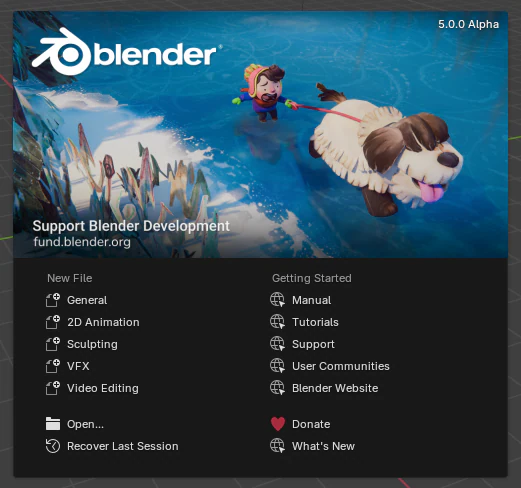
Blender Splash Screen.

To close the splash screen and start a new project, click anywhere outside the splash screen (but inside the Blender window) or press Esc. The splash screen will disappear revealing the default screen. To reopen the splash screen, click on the Blender icon in the Topbar and select Splash Screen.

Note

When starting Blender for the first time or updating to a new version, the “interactive region” contains a Quick Set Up Process.

Splash Image

The upper part of the splash screen contains the splash image with the Blender version in the top right.

Interactive Region

The interactive region is the bottom half of the splash screen.

New File

Start a new project based on a template.

Recent Files

Your most recently opened blend-files. This gives quick and easy access to your recent projects.

Open

Allows opening an existing blend-file.

Recover Last Session

Blender will try to recover the last session based on temporary files. See Recovering Data.

What’s New

Open the latest release notes.

Donate to Blender

Open Blender’s Development Fund website.

PreviousWindow System IntroductionNextTopbar

Adapted from this page of the Blender 5.2 LTS Manual by the Blender Documentation Team, licensed under CC BY-SA 4.0. This page is shared under the same licence.

Changed for Angelo: A note on Angelo's start: the splash shows its art only, then Angelo's own setup card or start panel instead of Quick Setup and New File. Restyled for this site, with links and images adapted (every change). No endorsement by the Blender Foundation is implied.