Skip to content

Docs/Blender manual/User Interface/Nodes/Common Nodes/Layout Nodes

Reroute Node

From the Blender 5.2 LTS Manual by the Blender Documentation Team, adapted for Angelo · CC BY-SA 4.0

Angelo guideBlender manual

  1. User Interface
    1. Window System
    2. Keymap
    3. UI Elements
    4. Tools & Operators
    5. Nodes
      1. Node Editors
      2. Node Parts
      3. Selecting Nodes
      4. Arranging Nodes
      5. Editing Nodes
      6. Common Nodes
        1. Common Output Nodes
        2. Common Utilities Nodes
        3. Layout Nodes
          1. Frame Node
          2. Reroute Node
      7. Node Groups
On this page · 1
  1. Properties

A node used primarily for organization. Reroute looks and behaves much like a socket on other nodes in that it supports one input connection while allowing multiple output connections.

To quickly add a Reroute node into an existing connection, hold Shift and RMB while sweeping across the link to add a Reroute node.
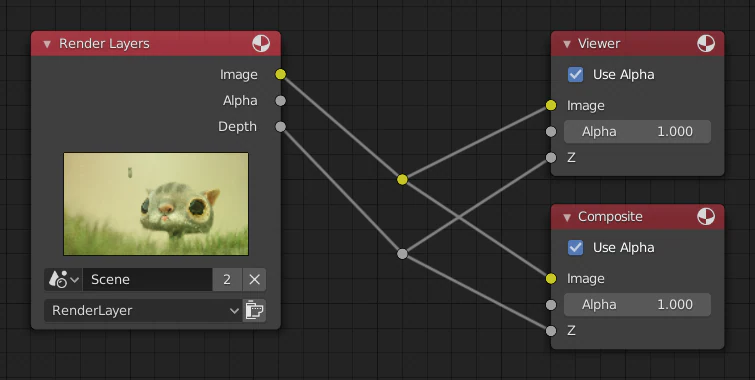
Properties

Input

Input value used for unconnected sockets.

PreviousFrame NodeNextNode Groups

Adapted from this page of the Blender 5.2 LTS Manual by the Blender Documentation Team, licensed under CC BY-SA 4.0. This page is shared under the same licence.

Restyled for this site, with links and images adapted (every change). No endorsement by the Blender Foundation is implied.