DocsBlender manualUser InterfaceNodesCommon NodesCommon Utilities Nodes
Node Closures
From the Blender 5.2 LTS Manual by the Blender Documentation Team, adapted for Angelo · CC BY-SA 4.0
A closure allows passing custom functionality into a node group. It acts like a function input, enabling user-defined behavior to be evaluated inside another node tree.
Closures make node groups more flexible and reusable by letting users inject part of a node network into another. This allows building higher-level tools where specific parts of a process can be customized without modifying the group itself.
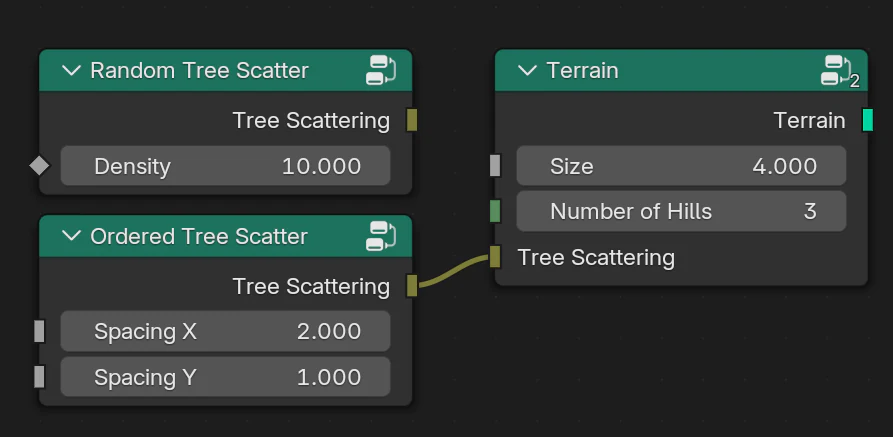
Using a closure to customize tree scattering within a terrain generator.
Overview
Closures are a socket type that represent callable node graphs. They define a set of inputs and outputs that can be evaluated inside another node group through the Evaluate Closure node.
When a closure is connected, its internal node graph is injected into the evaluation of the node group where it is used. This allows procedural systems to remain flexible while exposing clear, customizable control points.
Closures can be thought of as function parameters for node groups. They let users define operations that can be executed in a controlled environment defined by the parent node tree.
Note
Recursive closures are limited by the geometry nodes stack limit to prevent excessive recursion depth and stack overflows.
The stack limit can be adjusted in the user preferences: Geometry Nodes Stack Limit
Nodes
Closures are created and evaluated with the following nodes:
Socket Syncing
Closure nodes use socket names to match their inputs and outputs. If two closure nodes are connected but have mismatched signatures, Blender can offer to sync them automatically.
Sync happens automatically when a node is connected for the first time.
Existing sockets are never changed automatically to avoid overwriting user data.
A button (Sync Sockets) button appears in the node header when a mismatch is detected, allowing manual synchronization.
Example
Closures are useful when part of a node group’s logic should be user-defined. For example, a terrain generator can use a closure to define tree placement:
The Evaluate Closure node is placed where tree instances are distributed.
A closure input is exposed on the group’s interface.
A Closure node is connected defining any custom placement logic.
When the closure is evaluated, the contents of the connected node graph are executed inside the context of the terrain generator. This allows the generator to provide stable infrastructure (e.g., scattering, masks, attributes) while users supply their own functional behavior.
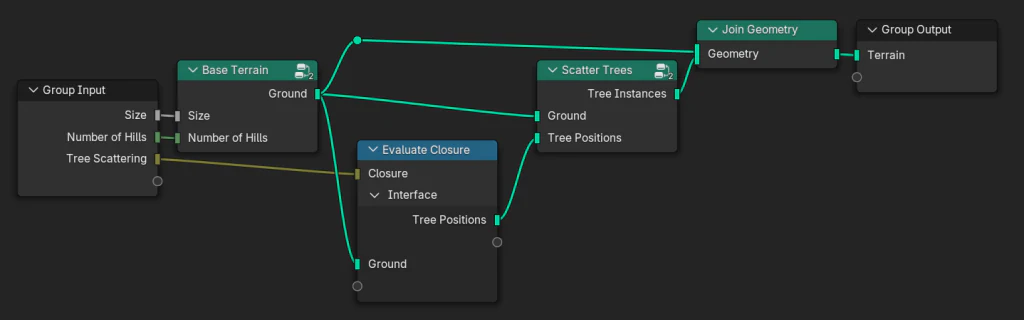
A terrain generator node group using closures for custom tree placement.