DocsBlender manualUser InterfaceUI Elements
List View
From the Blender 5.2 LTS Manual by the Blender Documentation Team, adapted for Angelo · CC BY-SA 4.0
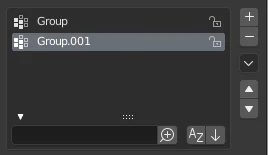
List view with expanded Filtering Options panel.
This control is useful for managing lists of items. In addition to the main list, there is a Filtering panel on the bottom (hidden by default) and modification buttons on the right.
- Select
To select an item, click LMB on it.
- Rename
By double-clicking on an item, you can edit its name via a text field. This can also be achieved by clicking it with Ctrl-LMB.
- Resize
The list view can be resized to show more or fewer items. Hover the mouse over the handle (::::), then click and drag to expand or shrink the list.
- Filter
Click the Show filtering options button (triangle on bottom left) to show or hide the filter option panel.
- Search Ctrl-F
Filters the list to only show items containing a certain term.
- Invert
Toggle between including items that match the search term and those that do not contain the search term.
- Sort by Name
This button switches between alphabetical and non-alphabetical ordering.
- Reverse
Sort objects in ascending or descending order. This also applies to alphabetical sorting, if selected.
On the right of the list view are list modification buttons:
- (Add)
Adds a new item.
- (Remove)
Removes the selected item.
- (Specials)
A menu with operators to edit list entries.
- / Move
Moves the selected item up/down one position.