DocsRender a region
Render a region over the last render
New in 1.0.8 Changed one thing in a corner of the shot? Drag a region over your last render and only that region renders again. Everything outside it stays exactly as it was, and the last render stays on screen while you wait.
What it does#
In Blender, a render region (Ctrl B) renders only a rectangle: the rest of the image comes out black or cropped away, and the image shows only that rectangle while it renders. Angelo renders the region into your last render instead: the region renders again, and every other pixel of every render pass (the separate layers a render can keep, such as depth or normals) stays the same. Your scene's own Render Region setting is never changed.
For a fifth of the frame, a region render is 3.4× faster than a full re-render in Cycles, and 1.7× faster in EEVEE. Between region renders Cycles keeps your scene loaded, so the next one starts sooner; that memory is freed when your next full render starts.
Render a region, step by step#
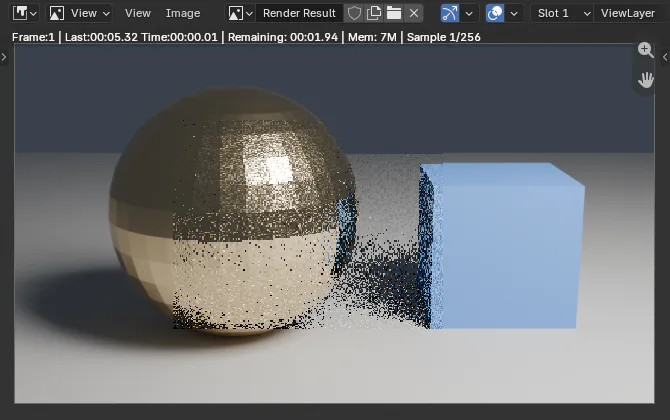
- Render the full frame first, with F12. The render window opens with your image.
- Change what you want: a material, a light, an object.
- In the render window, click Render region at the top left of the image. A hint at the top says Drag over the render to choose the region to render again. You can zoom and pan first.
- Drag a rectangle over the part to render. When you let go, the region renders at once, on top of the last render. Esc or a right-click leaves without rendering.
- A card in the corner says Region rendered over the last render, with Revert region, Render again (the same region, after your next change) and New region.
Other ways to start#
| Where | How |
|---|---|
| Chat bar | + ▸ Render ▸ Render region, under Create. |
| Render menu | Render ▸ Render Region Over Last Render. |
| Search | Press F3 and type Render Region. |
| 3D view | In a 3D view looking through the scene camera, the same drag works inside the camera's frame. |
From the menus, Angelo lets you drag wherever the last render shows: the render window, or else a 3D view through the camera. If neither is showing, it opens the render window. With no render yet, a card asks you to Render the full frame first.
Revert, stop and slots#
- Revert region puts the region's previous pixels back; Show region render swaps the new ones in again. Renders are not part of Blender's Undo, so this is the region's undo, one step deep.
- Stop a region render, or let it fail, and the card says The region did not render: the last render is kept exactly as it was, with Try again.
- The region renders over the render slot the render window shows. To compare before and after, render the full frame in one slot, switch to another slot, render a region there, and switch between them.
- The region you drew is kept with the scene, for Render again.
Limits#
- It works with every engine that supports a render region: Cycles, EEVEE, Workbench and installed engines that do.
- It renders one frame, never an animation, and never over the Video Sequencer's output.
- The last render must be the size the scene renders now (resolution and percentage). If you changed it, Angelo asks for a full render first.
- It is refused before anything changes while a render is running, when Burn Into Image (Output ▸ Metadata) is on, or when the compositor renders another scene.
- The compositor runs on the whole frame again, so an effect that spreads light, such as Glare or Blur, can change the finished image just outside the region, as a full render would. The render passes outside the region never change.
The agent#
You can ask the agent to re-render part of the last render too. Like every render it starts, it asks first: the approval says which part renders again, that every other pixel stays, and that nothing is written to disk. It shows progress in the chat with Cancel, and never changes the region you drew.